Access control
Face recognition access control
Let enrolled staff, residents and contractors through a door without a card — and keep an auditable record of every decision, including the refusals.
- 1:N matching against a managed gallery
- Works with existing ONVIF and RTSP cameras
- Runs on-premise or at the edge
- Fallback path required, not optional
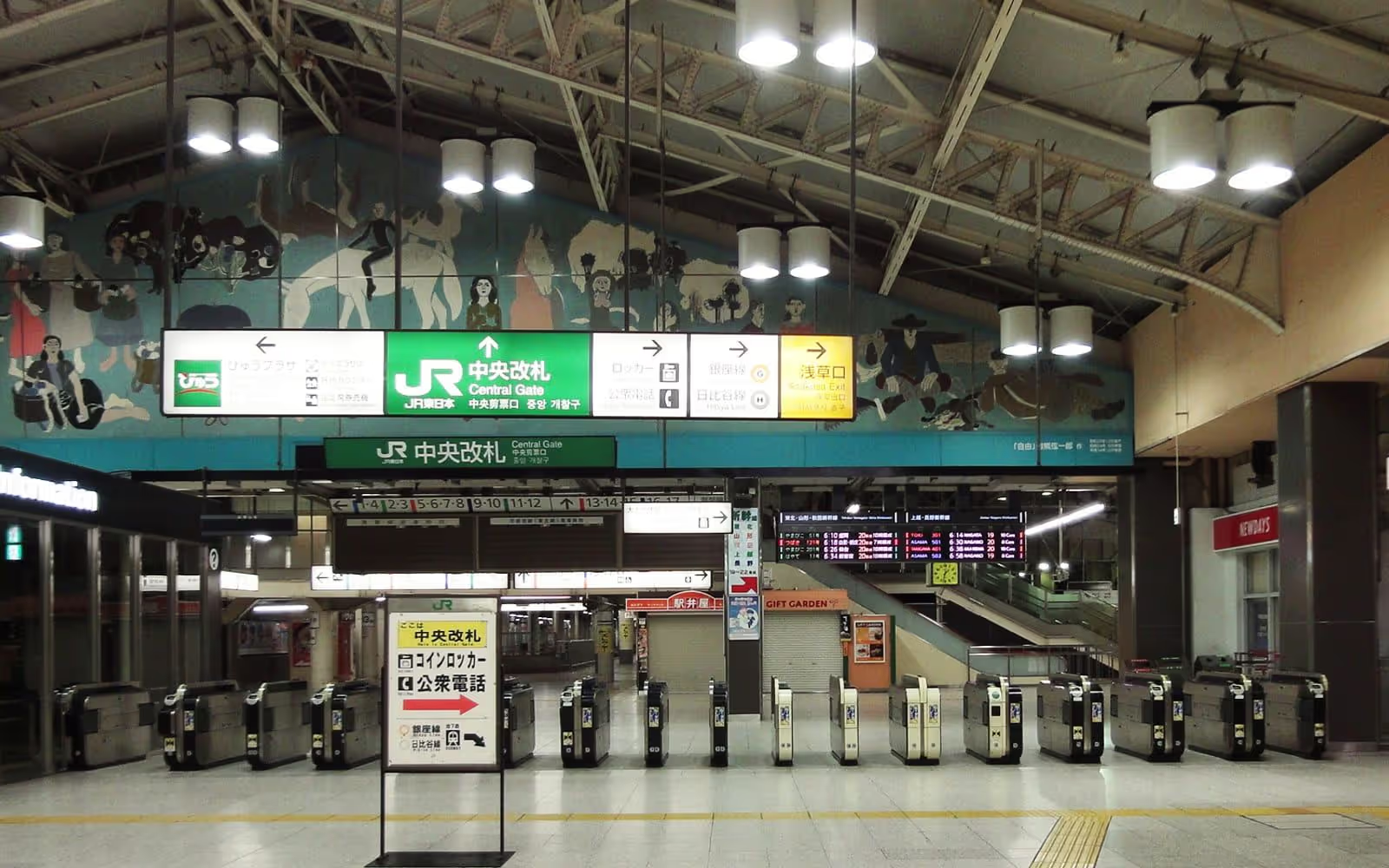
In short
Face recognition access control identifies an enrolled person at a door using 1:N matching against a managed gallery, then sends an open command to the door controller. It removes cards, shortens entrance queues, and records every decision — including refusals — for audit.
An access control project is rarely about the algorithm. It is about a specific door, in a specific building, that a specific set of people walk through at a specific time of day — and the honest version of this page is about those constraints rather than about matching.
The two decisions that determine the outcome are made before any software is installed: where the camera sits relative to where people actually stand, and what happens to the people the system will not serve. Everything else is configuration.
What is actually going wrong at the door
Every one of these is a reason organisations start looking at face recognition. Each is answered below with what the system does about it — and, where relevant, what it does not.
Cards are lost, borrowed, copied or shared, so the log records a credential rather than a person.
A face is presented by the person it belongs to. The audit trail becomes a record of who entered rather than which card was used, which is the distinction that matters after an incident.
People forget credentials, and reception spends its morning issuing temporary passes.
Enrolled staff need nothing on them. The temporary-pass workload drops to visitors and contractors, which is a smaller and more predictable queue.
Entrances back up at shift change, and the bottleneck is the credential, not the door.
Recognition happens while someone walks towards the door rather than after they stop at it. Throughput is then bounded by the door mechanism, which is a hardware problem with a known answer.
Staff are manually checking identities at the desk, which does not scale and is inconsistent.
The routine comparison is automated and only exceptions reach a person. The exception rate then becomes the number worth managing, and it is measurable.
Nobody can see attempted unauthorised access — only successful entries are logged.
A refused match is an event with the same evidence as an accepted one: camera, time, image, score and the threshold in force. Refusals are usually the more interesting half of the log.
Access control and video evidence live in separate systems, so investigations mean two exports.
Where a VMS is present, the access event carries the camera and timestamp that locate the recorded video, so one query answers the question.
Tailgating defeats the credential entirely — one badge, two people through.
Face recognition does not by itself stop tailgating. It detects that a second, unenrolled face passed, which turns an invisible event into a reviewable one; physically preventing it still needs a speed gate or a mantrap.
Visitor and contractor management is a clipboard, a spreadsheet and a printed badge.
Temporary enrolment with an automatic expiry means a contractor’s access ends on the date it was supposed to, without anyone remembering to revoke it.
Cloud-hosted credentials stop working when the site loses its internet connection.
On-premise and edge deployments keep matching local. The door keeps working while the wide-area link does not, because nothing in the decision path crosses it.
There is no defensible process for the cases the system gets wrong.
Exception handling is designed in: who reviews, on what evidence, how the override is logged, and how often overrides are audited for pattern.
How it works
Enrolment to audit, and the exception path beside it
The happy path is four steps. The design work is in the fifth column — what happens to everyone the first four do not serve.
-
Enrol
A face is captured under the conditions the site will actually use, quality-scored, and converted to a biometric template. Consent and lawful basis are recorded with it.
Fails when: Enrolment is done in a bright meeting room and the door is lit from behind; every later comparison inherits the mismatch.
-
Capture and gate
The entrance camera detects and tracks faces, discarding frames below the quality floor rather than comparing them and producing noise.
Fails when: Quality gating is relaxed to raise the match rate, and false matches rise faster than true ones.
-
Match and decide
1:N comparison against the enrolled gallery at a threshold chosen for what a wrong entry costs here. The result is a decision plus the evidence behind it.
Fails when: The threshold is a default nobody selected, so nobody can defend it when asked.
-
Act and record
An open command reaches the door controller; the event, image, score, threshold and outcome reach the audit log and, where present, the VMS.
Fails when: The decision is correct but the audit record keeps only the successes.
Matching mode
1:N at the door, 1:1 where a credential already exists
These are different problems with different error behaviour, and choosing the wrong one makes a deployment harder than it needs to be.
| 1:N identification | 1:1 verification | |
|---|---|---|
| The question asked | Which of the enrolled people is this, if any? | Is this the person this credential says it is? |
| What the person does | Walks towards the door | Taps a card, enters a number or presents a code first |
| Effect of gallery size | Partial: Error rates rise as the gallery grows | Supported: Unaffected by gallery size |
| Error rates reported as | FPIR and FNIR | FMR and FNMR |
| Best for | Hands-free entry where no second credential exists | High-security doors, or where a card or PIN is already issued |
| Main design cost | Threshold and gallery governance | Issuing and managing the first credential |
Where a credential is already in circulation, using it to reduce the problem to 1:1 is usually the stronger design — it is measurably easier and it keeps the second factor.
Capture conditions
What decides whether the camera can do this
Five measurable things. None of them is the brand on the housing.
- Face size at the capture point
- Measured in pixels across the eyes where a person actually stands, not at the centre of the frame. Everything downstream is bounded by this number, and it is the one most often estimated rather than measured.
- Angle between camera and face
- A camera mounted high enough to be out of reach is often mounted high enough to see mostly the top of a head. The compromise between vandal resistance and usable geometry is a real one and should be made deliberately.
- Lighting direction and range
- Glass entrances backlight everyone who walks in. The fix is usually a light or a repositioned camera rather than a different algorithm, and it is cheap when identified early and expensive when identified after go-live.
- Entrance behaviour
- People approaching a door look at the door, at their phone, or at the person beside them. Placing the camera where a person is naturally looking removes a pose problem that no amount of tuning solves.
- Stream compression and frame rate
- Aggressive compression removes exactly the fine detail recognition depends on. A stream that looks fine to a person watching it can be well below what matching needs.
Integration and deployment
The decision has to reach the thing that opens
An access control project succeeds at the interface, not at the algorithm. These are the connections that matter and the architectures that carry them.
Doors and turnstiles
A match result reaches the door controller as a relay closure, an OSDP or Wiegand message, or an API call — whichever the installed hardware speaks.
Access platforms
Where an access control system is already the system of record, recognition supplies the credential decision and the platform keeps the entitlements.
Visitor and attendance
Temporary enrolment with an automatic expiry covers contractors and visitors; attendance systems consume the same events.
Video management
Events carry the camera and timestamp that locate the recorded video, so an investigation is one query rather than two exports.
On-premise
One server serves many doors across a campus. The right answer where the camera estate is concentrated and there is somewhere to rack a machine.
On-premise architecture →Edge
A device beside the entrance keeps the door working when the site loses its link. The right answer for many small sites, or for one door that must never stop.
Edge architecture →Governance
Human review, exceptions and the limits of the system
An access control system that cannot be overruled is a system that will eventually be overruled by someone propping the door open.
Exception handling is the design, not the afterthought
Every deployment refuses someone it should have admitted. What separates a working installation from a resented one is what happens in the next ten seconds: whether there is a visible alternative, whether it is quick, and whether using it marks someone out in front of their colleagues.
Review that is actually a control
Log the operator’s decision separately from the system’s and compare them periodically. If the human essentially never disagrees, the review step is adding a signature rather than oversight — a failure mode that is invisible unless you deliberately measure for it.
What this system should not be used for
Entrance recognition is a credential decision. It is not a basis for productivity monitoring, not a basis for inferring who was with whom, and not a basis for any consequential action against a person without a human reviewing the evidence first. Purpose limitation is enforceable only if the purpose was narrow enough to test in the first place.
ITOCHU Techno-Solutions Corporation adopted Ayonix FaceID across its offices in 2016 to replace RFID access cards, using iPads as facial-authentication terminals
- Source type
- Published by the customer
- Verified
- 2026-09-11 · Gabriel Bamola, Chief Marketing Officer
What this does not establish
Deployment description only. No headcount, door count, error rate or cost saving is published.
1:1 verification, 1:N identification, watchlist matching, face tracking, and liveness and presentation-attack detection
- Source type
- Ayonix first-party statement
- Verified
- 2026-09-11 · Jan Mocary, Chief Technology Officer
What this does not establish
Presentation-attack resistance is specific to the attack instruments tested for. Liveness is available in supported capture workflows, not universally.
Access control readiness checklist
Work through this before requesting a quotation. A supplier who cannot answer these about your site is quoting for a product rather than for your entrance.
-
Measure the face at the point people actually pass
Not at the centre of the frame. Stand where a person stands, capture a still, and count the pixels across the eyes. This single measurement predicts more about the outcome than the choice of algorithm.
-
Establish the lighting at the worst hour, not the best
A glass entrance at 08:00 in winter and at 16:00 in summer are different cameras. Backlight is the most common cause of a deployment that worked in the demo and not in production.
-
Decide the enrolment process before the hardware
Who enrols, under what conditions, with what consent record, and what happens when someone’s appearance changes. Enrolment quality is the ceiling on every later comparison.
-
Size the gallery and state how it will grow
1:N error rates rise with gallery size, so a system measured at 200 enrolments does not describe the same system at 20,000. Agree the number the pilot will be measured at.
-
Choose the threshold against what each error costs here
A wrong entry to a server room and a wrong entry to a staff canteen are not the same event. Record where the threshold was set and why, and who may change it.
-
Design the fallback before go-live
Card, PIN, intercom or staffed desk — something must serve people the system cannot or should not recognise. This path sizes the staffing, which sizes the business case.
-
Define exception handling and who reviews it
What a refused person does next, who can override, how the override is logged, and how often overrides are audited for pattern.
-
Confirm the door controller interface
Dry contact, Wiegand, OSDP, an API, or through the access platform already installed. The event has to reach the thing that opens, and that is an integration question with a definite answer.
-
Agree retention in code, not in policy
How long captured images are kept, how long templates persist after someone leaves, and what deletes them. A retention period that depends on a person remembering is not a control.
-
Write the acceptance criteria before the pilot
Both error types, the measurement window, the population and the reporting format — agreed in writing, before anyone has an incentive to move them.
Frequently asked questions
Is face recognition access control 1:1 or 1:N?
At a door it is normally 1:N: the person presents no claim of identity, so the system searches the enrolled gallery for a match. 1:1 verification applies where the person first identifies themselves — tapping a card, entering an employee number or presenting a QR code — and the face then confirms that specific record. 1:1 is materially easier and its error rates do not change with gallery size, so where a second credential already exists, using it to turn the problem into 1:1 is usually the better design.
Does face recognition stop tailgating?
Not on its own. It can detect that an additional, unenrolled face passed the camera and raise that as an event, which turns tailgating from an invisible occurrence into a reviewable one. Physically preventing it still requires a speed gate, a turnstile or a mantrap — face recognition improves the detection and the evidence, not the barrier.
What happens to people who cannot or will not use it?
They need a path through that does not mark them out, and designing it is not optional. Children, wheelchair users, people in lawful head coverings, people with certain medical conditions and people who simply decline all have to be able to enter. In practice that means a card, a PIN, an intercom or a staffed desk, sized for the volume it will actually carry. The fallback path is usually what determines the staffing cost of the whole project.
Will it work with the cameras we already have?
Often, but the answer comes from measurement rather than from the specification sheet. What matters is the pixels across the face at the point people pass, the angle between the camera and the face, the lighting direction and the compression the stream applies. A representative video assessment of your actual entrance answers it definitively, and takes days rather than weeks.
Does it need an internet connection?
No. On-premise and edge deployments keep enrolment, matching and the door decision inside your own network, so the entrance keeps working while the wide-area link does not. This is usually the deciding factor for sites where a failed link would mean a queue at the door rather than an inconvenience.
How is liveness relevant at a door?
It resists someone presenting a photograph or a phone screen to the camera. Where it is available in the capture workflow, it should be specified against the attack instruments it was actually tested against — a printed photograph, a screen replay, a mask — rather than accepted as a checkbox. A liveness claim without named attack instruments covers nothing specific.
What does the audit trail contain?
For each decision: the camera, the timestamp, the captured image, the matched identity or the absence of one, the similarity score, the threshold in force at that moment, the resulting action, and any operator override with who performed it. Refusals are recorded with the same detail as entries, which is what makes the log useful after an incident.
How long are face images and templates kept?
That is a configuration decision the customer makes and should be able to defend. The defensible default is to discard the captured image once the match resolves, keep the template only while the person’s access entitlement lasts, and enforce both periods in the software rather than in a policy document. Deletion should be logged.
Related
Where to go next
Camera planning guide
The geometry that decides whether an entrance camera can support recognition at all.
Edge face recognition
Keeping the door working when the site loses its link to head office.
ITOCHU Techno-Solutions case study
Replacing RFID office access cards with Ayonix FaceID, from 2016.
Privacy and governance
Purpose, retention, human review and the fallback that does not single people out.
Milestone XProtect integration
Putting the access event next to the recorded video that shows it.
Pilot checklist
Acceptance criteria agreed before anyone arrives on site.
Next step
Plan my entrance
Send the entrance you are trying to solve — a photograph from where people stand, the approximate headcount, and what the door is connected to. The first response covers capture geometry and the fallback path, not pricing.